I cannot see chat during a ride
Last updated About 2 years ago
If you are on a group ride or group workout in FulGaz and cannot see chat messages that other riders are posting, or you do not have the CHAT button on the pre-ride information screen, you may need to set up your chat account (or reconfigure your chat settings).
You can do this in your FulGaz app's Settings -> Chat -> Configure Chat
Here you can set up your profile. You'll be prompted to update your personal details, then tick to confirm you agree to use chat.
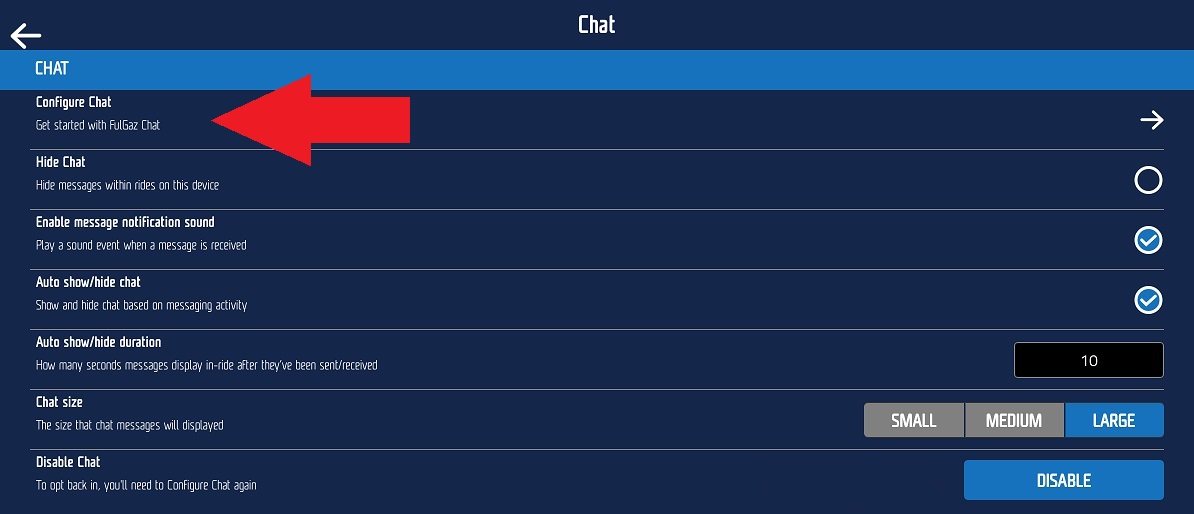
In the chat settings you can also customise how the chat appears during rides, including the size of the chat boxes, and how long chats appear on screen once they are sent or received.
NOTE: Chat messaging is only a feature on group rides, group workouts, and events on FulGaz. Regular rides are not chat enabled, so will not show the CHAT buttons.
Was this helpful?
Still need help? Ask the team