Can I disable chat? How to switch off chat messaging
Last updated About 2 years ago
Yes!
We understand that not everyone wishes to chat or see messages during their FulGaz group rides, so we've made it easy to opt out of chat completely.
To disable chat:
- Open FulGaz and head into Settings -> Chat
- Select the DISABLE CHAT option
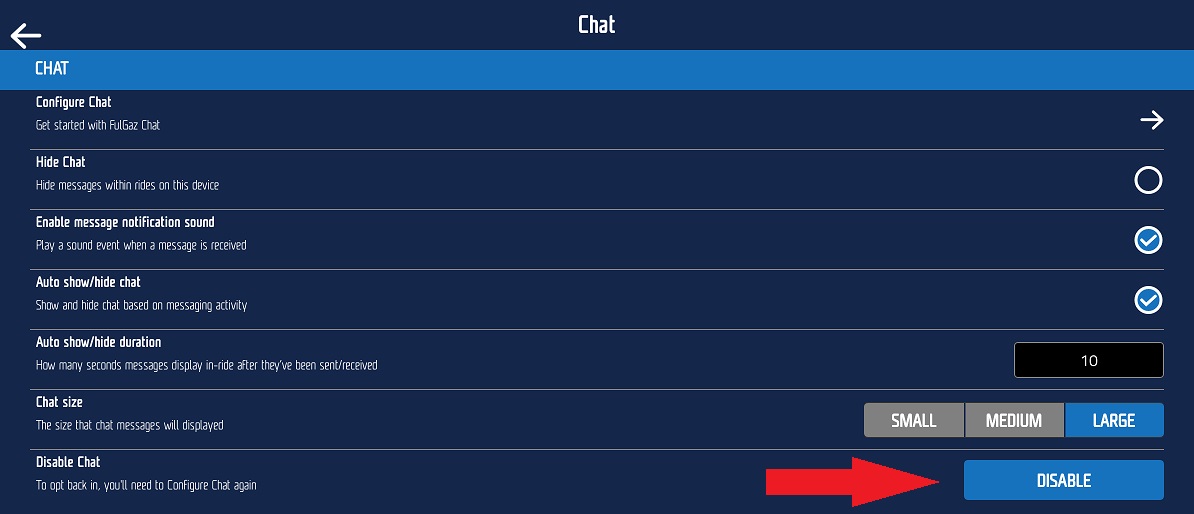
You will no longer see any messages or be able to send messages during group rides.
To opt back in at any time and use chat, simply select the "Configure Chat" option from the menu and follow the prompts to reactivate your chat account.
Was this helpful?
Still need help? Ask the team