Streaming to FulGaz via WiFi using MAMP
Last updated Over 1 year ago
By setting up MAMP
You can store video files on a computer, then stream them to FulGaz on your Apple TV. This is a great way to get around the file storage limitations on the Apple TV.
FulGaz Member's Page Video Download Portal
Troubleshooting
A great way to test that you've got the details correct is to try the address you're using in FulGaz in a web browser on any computer on your network. The setup screen looks like this in FulGaz:
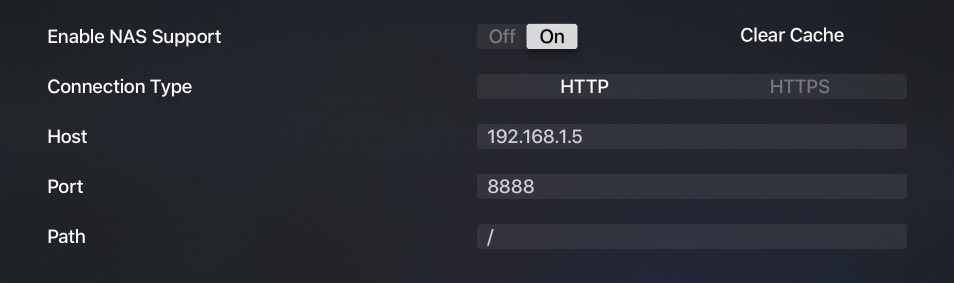
If we wanted to ride the Marin Headlands ride, this is the address that would play the correct video: http://192.168.1.5:8888/marin-headlands-extended.mp4.
If that address doesn't work in a web browser on your network, it won't work in FulGaz either. Check you've got the settings correct and try again (your web address will differ from the link above).
Common issues
- MAMP server isn't turned on
- You've got the default port set up (8888) but your MAMP is using a different one
- Videos have been downloaded with ID numbers instead of their names
- Your router has been restarted, or your computer has moved IP location
Ethernet
If you have your Apple TV plugged into your local network using an Ethernet connection, it is possible that it will see a different IP address over Ethernet than it would over WiFi. This can be quite problematic to track down.
The best way to do it is to log into your router and see what IP address that sees for the computer running MAMP - that is the correct IP address. This can be tested using the troubleshooting tip above.
Further help and advice
The best place to ask for help is in the FulGaz riders Facebook group. You'll find people there with the same setup as you that can offer some tips and advice to get you up and running.
Was this helpful?
Still need help? Ask the team